If you want to pursue the path of becoming a doctor in the US, the first step is to register for an ECFMG ID.
Having an ECFMG ID will help you do most of the paperwork-related tasks on this path: from registering for Step exams, getting ECFMG Certification, submitting ERAS documents,… on the system without having to go to any headquarters to do it. job.
For an easy comparison, it’s like having a CCCD number in Vietnam and you can do administrative procedures online through the public service portal.
You can register for an ECFMG ID right from the first years of medical school and then leave it there until you graduate to start taking the USMLE Step 1/2/3, absolutely no problem.
Therefore, if you intend to follow this path early, you can register for an ID now to avoid unwanted changes in the future.
I. ELIGIBILITY CONDITIONS FOR ECFMG ID REGISTRATION
If you want to become a doctor in the US in general and apply for an ECFMG ID in particular, first, the School of Medicine & The academic year in which you are studying/graduated must be “recognized” by ECFMG.
The purpose of this certification is to let schools in the US know that you have been trained at a medical school with standards “equivalent” to doctors trained in the US, so they can “feel secure” in accepting you into their program.
Accepting a doctor for training is a responsibility and if anything happens, it will damage the reputation of that residency program in the future.
I made a video showing how to check, you can see if your school is on the list here.
II. 8 STEPS TO REGISTER ECFMG ID (FOR THOSE WHO HAVE NEVER REGISTERED)
Step 1
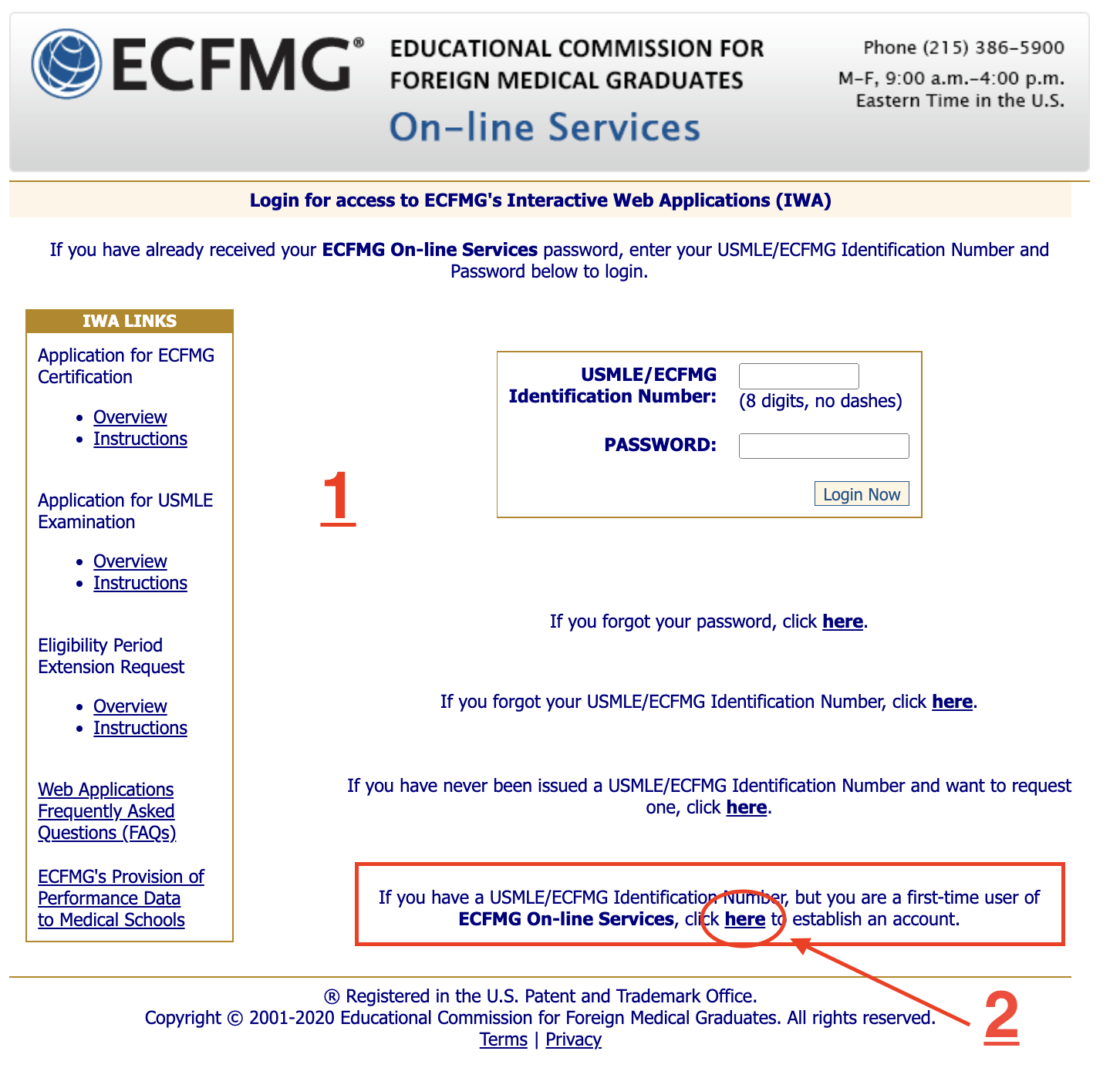
Go to the website of ECFMG (interface as shown in picture 1 below):
Step 2:
Select “If you have never been issued a USMLE/ECFMG Identification Number and want to request one, click here”
Step 3
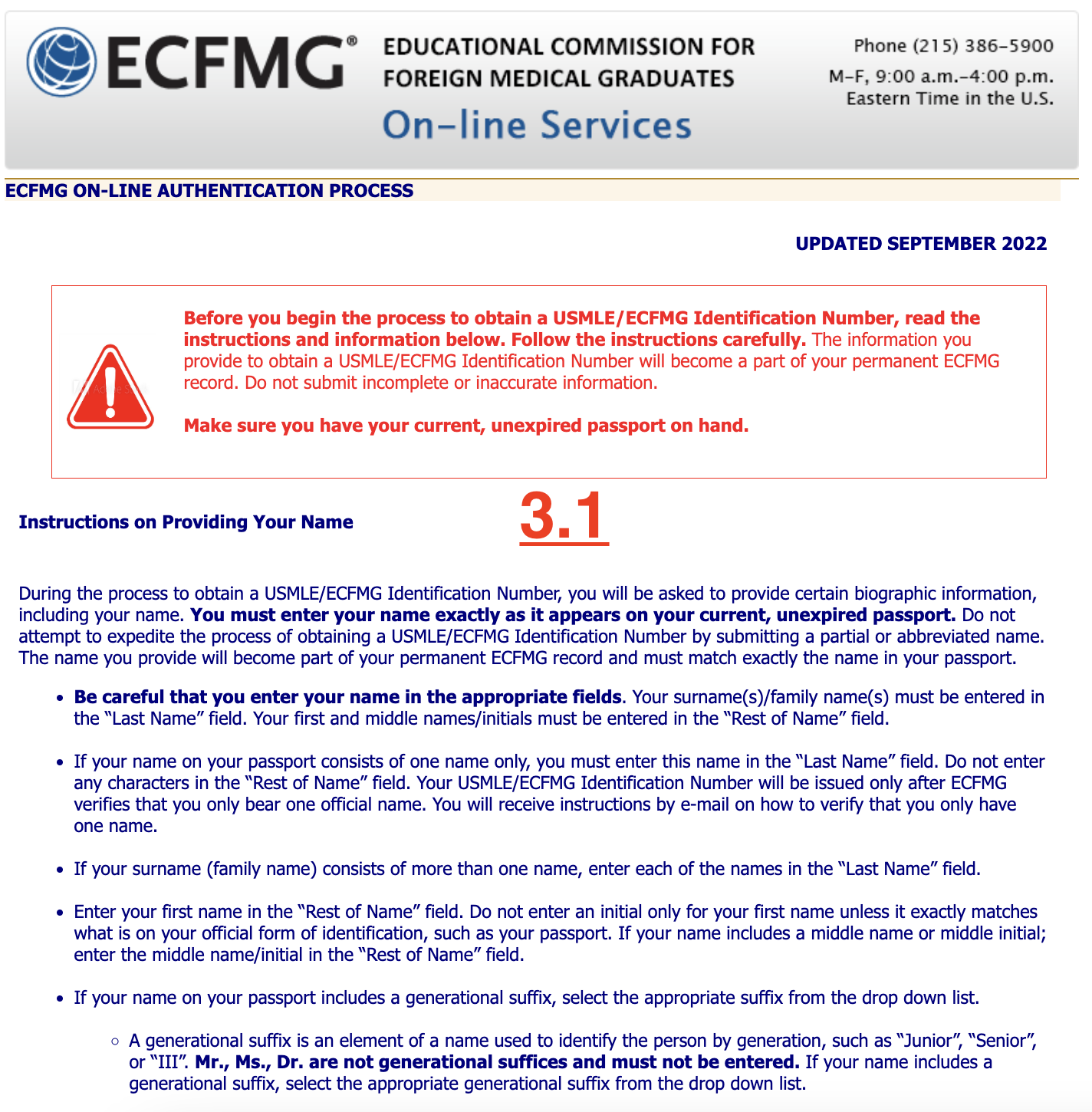
After clicking on the word “here” as instructed above, the following interface will appear on the website:
Step 4
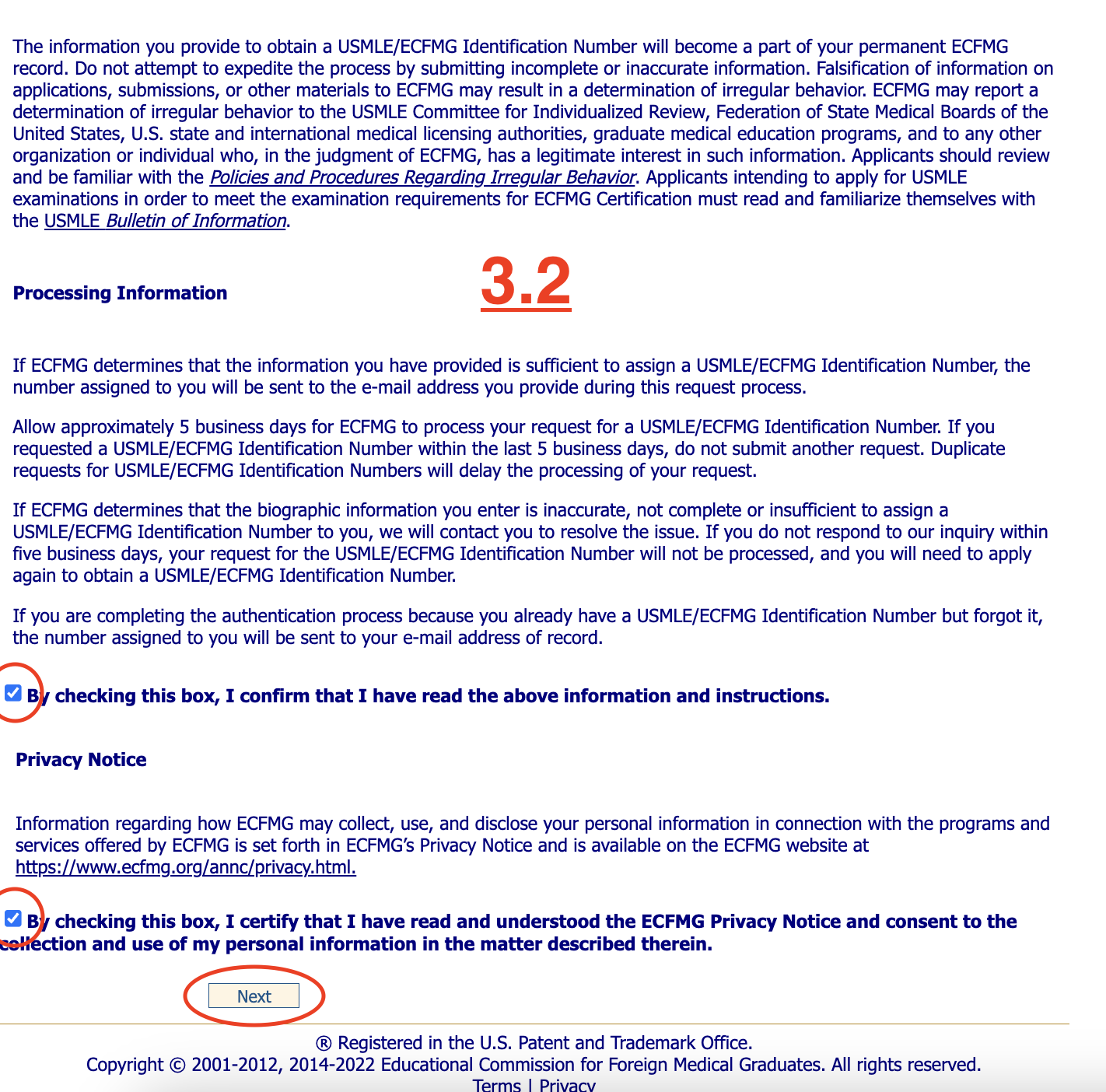
Scroll down to the bottom, tick the 2 boxes below, then select Next.
Step 5
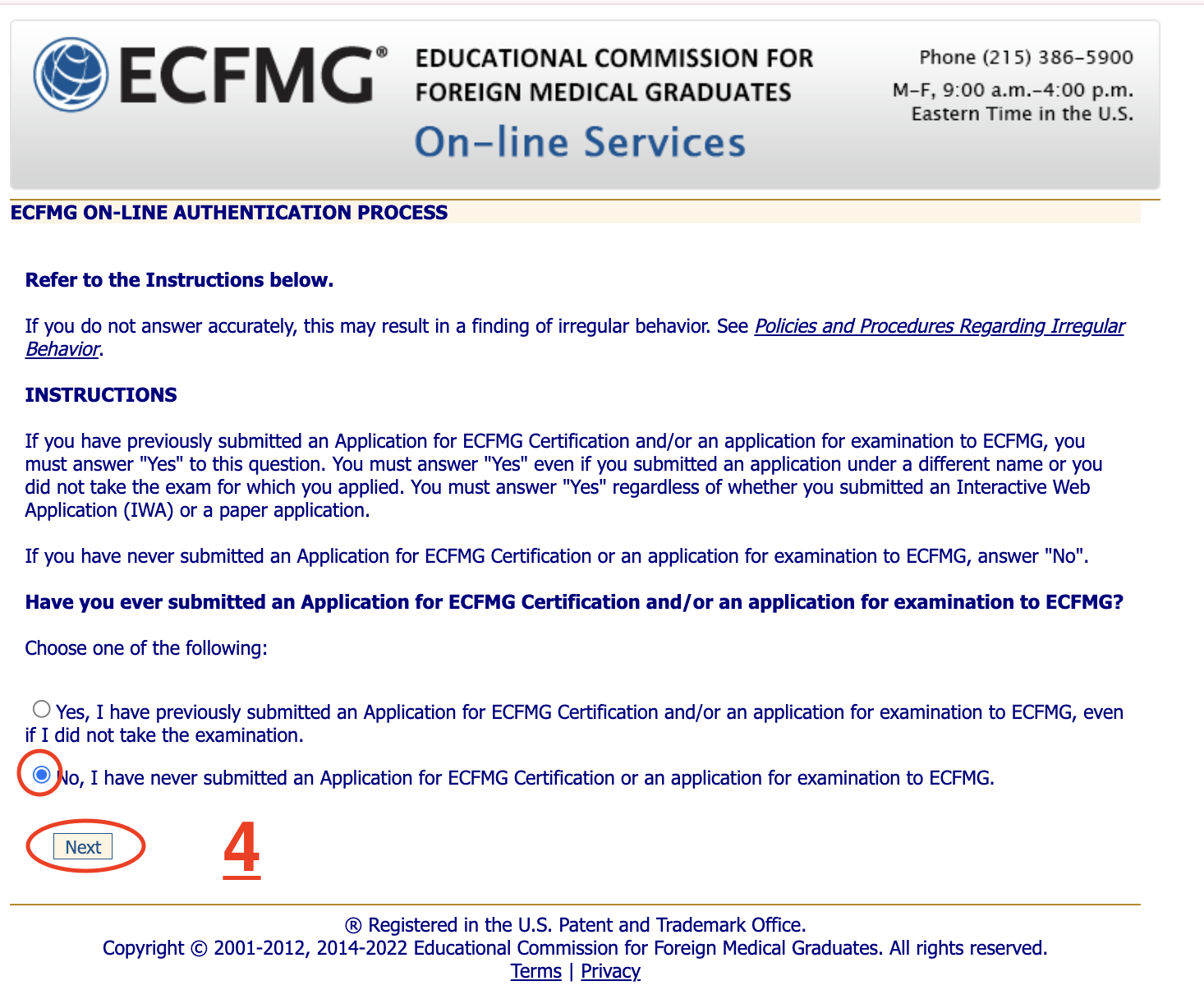
On the next page, select No → Next.
Step 6
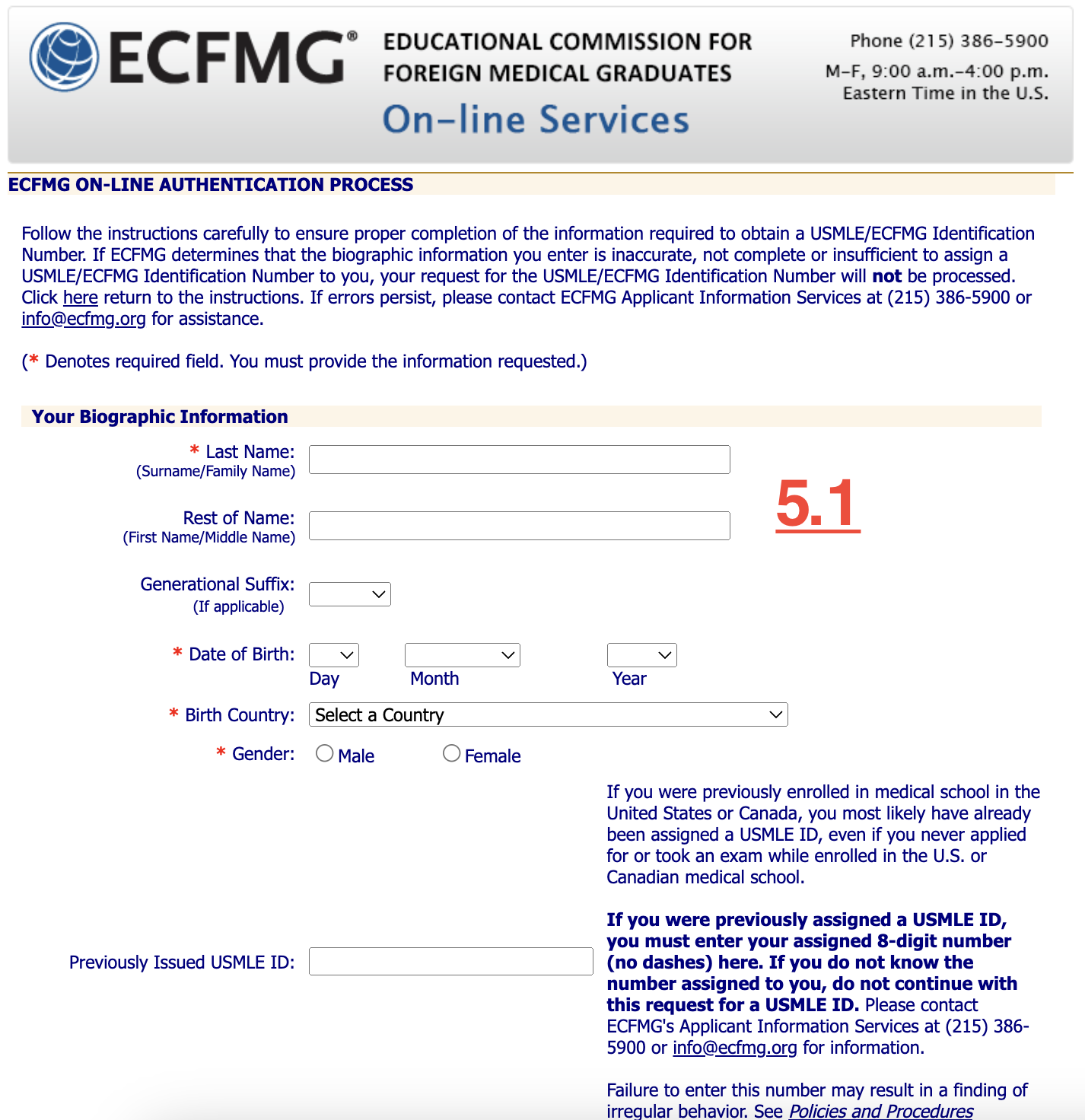
6.1 Biographic Information (H5.1):
Last Name: Last Name
Rest of Name: Rest of name
Generation Suffix: This section is blank
Date of birth: Date of birth
Country: Select country by passport
Previously Issued USMLE ID: This section is blank
Social Security Number: For people with a US social security number, if so, enter it, otherwise leave blank.
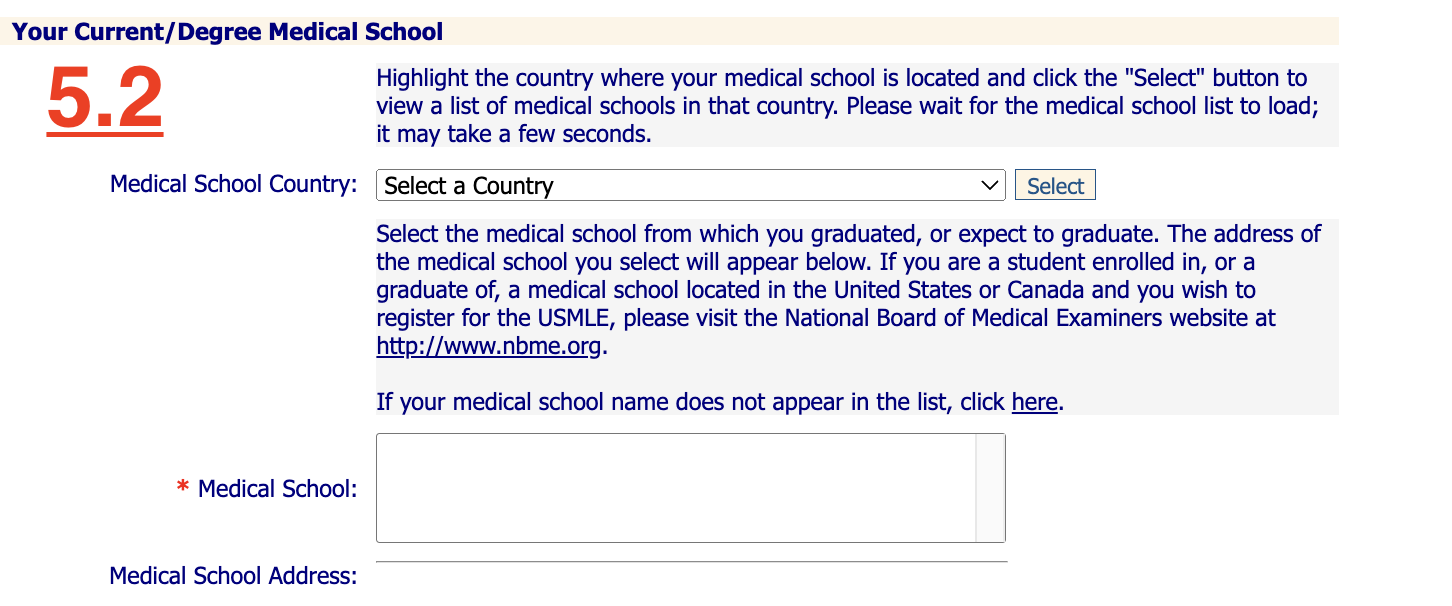
6.2 Current/Degree Medical School (H5.2):
Medical School Country: Vietnam → select
It will display schools in Vietnam recognized by ECFMG → tick to select your medical school → the system will automatically fill in Medical School Address.
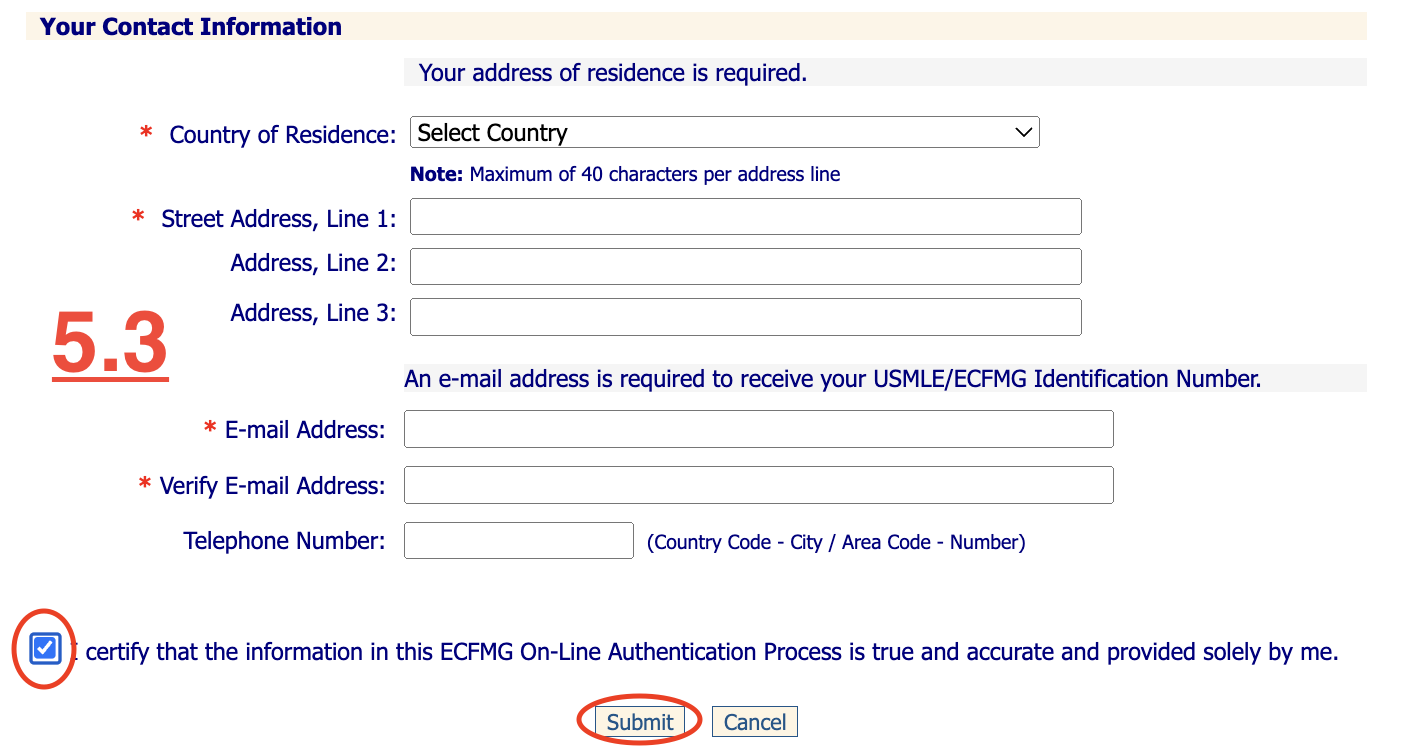
6.3 Contact Information (H5.3):
Country of residence: Select the country of your current citizenship (eg: Vietnam)
Street address: Enter your home address, ECFMG will later send a certificate if you take all the USMLE steps, this address can be easily updated and corrected so you don’t need to worry.
Email: Enter your email correctly, because later on many other paperwork will be done via mail
Telephone number: Enter your phone number, remember to change the first 0 to +84.
When everything is done → tick the box below and click Submit.
Step 7
After creating your account, it may take a few days to receive your ID number and password from ECFMG. They will be sent separately via 2 separate emails (the first email contains the ID and the second email contains the password.
Step 8
Once you have your password, go to the website to log in and change your password.
III. NOTES WHEN FILLING OUT ECFMG REGISTRATION INFORMATION (MUST READ ONCE BEFORE REGISTERING)
Enter information in Vietnamese without accents.
Write the name exactly according to the name in the passport, do not select prefixes and suffixes, avoid writing incorrectly, it will be very time-consuming to change later.
For example: If your name is Nguyen Van Nam, fill in
Last name: Nguyen – All other names: Van Nam
Pay close attention to these two items to avoid confusion
Capitalize only the first letter, not all caps or all lower case
You should get a professional email to register because almost all the procedures you will do via email. Imagine you are the Director/Secretary of a residency program and you are writing an email with a candidate: bigboycutephomaique@gmai.com! What would you think about that candidate?
Do not use your edu email to register for an ECFMG ID because it may be deleted after you graduate, leading to the loss of your account later.
Read all information in section 6 carefully before submitting, making sure all information matches the information on the passport.
Above are all 8 steps to help you register your ECFMG ID successfully the first time. If during the implementation process, anything arises, please send a message to Facebook Dr. Christina Nguyen for support.
If you want to pursue the path of becoming a doctor in the US, the first step is to register for an ECFMG ID.
Having an ECFMG ID will help you do most of the paperwork-related tasks on this path: from registering for Step exams, getting ECFMG Certification, submitting ERAS documents,… on the system without having to go to any headquarters to do it. job.
For an easy comparison, it’s like having a CCCD number in Vietnam and you can do administrative procedures online through the public service portal.
You can register for an ECFMG ID right from the first years of medical school and then leave it there until you graduate to start taking the USMLE Step 1/2/3, absolutely no problem.
Therefore, if you intend to follow this path early, you can register for an ID now to avoid unwanted changes in the future.
I. ELIGIBILITY CONDITIONS FOR ECFMG ID REGISTRATION
If you want to become a doctor in the US in general and apply for an ECFMG ID in particular, first, the School of Medicine & The academic year in which you are studying/graduated must be “recognized” by ECFMG.
The purpose of this certification is to let schools in the US know that you have been trained at a medical school with standards “equivalent” to doctors trained in the US, so they can “feel secure” in accepting you into their program.
Accepting a doctor for training is a responsibility and if anything happens, it will damage the reputation of that residency program in the future.
I made a video showing how to check, you can see if your school is on the list here.
II. 8 STEPS TO REGISTER ECFMG ID (FOR THOSE WHO HAVE NEVER REGISTERED)
Step 1
Go to the website of ECFMG (interface as shown in picture 1 below):
Step 2:
Select “If you have never been issued a USMLE/ECFMG Identification Number and want to request one, click here”
Step 3
After clicking on the word “here” as instructed above, the following interface will appear on the website:
Step 4
Scroll down to the bottom, tick the 2 boxes below, then select Next.
Step 5
On the next page, select No → Next.
Step 6
6.1 Biographic Information (H5.1):
Last Name: Last Name
Rest of Name: Rest of name
Generation Suffix: This section is blank
Date of birth: Date of birth
Country: Select country by passport
Previously Issued USMLE ID: This section is blank
Social Security Number: For people with a US social security number, if so, enter it, otherwise leave blank.
6.2 Current/Degree Medical School (H5.2):
Medical School Country: Vietnam → select
It will display schools in Vietnam recognized by ECFMG → tick to select your medical school → the system will automatically fill in Medical School Address.
6.3 Contact Information (H5.3):
Country of residence: Select the country of your current citizenship (eg: Vietnam)
Street address: Enter your home address, ECFMG will later send a certificate if you take all the USMLE steps, this address can be easily updated and corrected so you don’t need to worry.
Email: Enter your email correctly, because later on many other paperwork will be done via mail
Telephone number: Enter your phone number, remember to change the first 0 to +84.
When everything is done → tick the box below and click Submit.
Step 7
After creating your account, it may take a few days to receive your ID number and password from ECFMG. They will be sent separately via 2 separate emails (the first email contains the ID and the second email contains the password.
Step 8
Once you have your password, go to the website to log in and change your password.
III. NOTES WHEN FILLING OUT ECFMG REGISTRATION INFORMATION (MUST READ ONCE BEFORE REGISTERING)
Enter information in Vietnamese without accents.
Write the name exactly according to the name in the passport, do not select prefixes and suffixes, avoid writing incorrectly, it will be very time-consuming to change later.
For example: If your name is Nguyen Van Nam, fill in
Last name: Nguyen – All other names: Van Nam
Pay close attention to these two items to avoid confusion
Capitalize only the first letter, not all caps or all lower case
You should get a professional email to register because almost all the procedures you will do via email. Imagine you are the Director/Secretary of a residency program and you are writing an email with a candidate: bigboycutephomaique@gmai.com! What would you think about that candidate?
Do not use your edu email to register for an ECFMG ID because it may be deleted after you graduate, leading to the loss of your account later.
Read all information in section 6 carefully before submitting, making sure all information matches the information on the passport.
Above are all 8 steps to help you register your ECFMG ID successfully the first time. If during the implementation process, anything arises, please send a message to Facebook Dr. Christina Nguyen for support.
Would you like to learn how to communicate with patients in English to U.S. medical standards, explore the mindset and skills needed to succeed in medicine in America, or learn more about life as a doctor in the U.S.?
Would you like to learn how to communicate with patients in English to U.S. medical standards, explore the mindset and skills needed to succeed in medicine in America, or learn more about life as a doctor in the U.S.?
Years ago, when I sat down to write my application essay for the Bill Gates scholarship, I wrote about the dream of becoming a doctor who could help people across languages and cultures. That journey eventually led me to practice family medicine in the United States and to build The Phoenix Medical Academy — so students and immigrant families can find clearer guidance on studying medicine, residency, and life in America.